# Modern Tab Navigation in SwiftUI: iOS 18-26
Table of Contents
Tab bars have become my go-to navigation pattern for iOS apps. Over the years, I’ve watched many apps experiment with burger menus and hidden navigation, only to eventually return to tabs. There’s a reason Apple emphasizes tab bars so heavily in their own apps – they work. They’re discoverable, always accessible, and scale beautifully from iPhone to iPad. In my experience, tab bars are simply the most robust foundation for app navigation. Even Apple returned from it’s experimental Photos App single page navigation back again to a (simple) tab bar in iOS 26.
Recently, I faced the challenge of migrating an existing app to iOS 26. The app was still using the deprecated .tabItem() API, and I wanted to bring it up to modern standards while supporting both iOS 18.x and iOS 26. This is that journey.
The Migration: From Deprecated to ModernLink to heading
Step 1: Migration to the New Tab API (iOS 18.x)Link to heading
The first hurdle was switching from .tabItem() to the new Tab API.
Before (deprecated):
TabView { BookmarksView() .tabItem { Label("Bookmarks", systemImage: "book") }}After (iOS 18+):
TabView(selection: $selectedTab) { Tab(value: .bookmarks) { NavigationStack(path: $bookmarksPath) { BookmarksView() } } label: { Label("Bookmarks", systemImage: "book") }}The most important changes:
Tabis now a standalone container instead of a modifier- Each tab gets a
valuefor selection binding - Each tab receives its own
NavigationStackwith a separate path
This last point was crucial: each tab maintains its own navigation history. When switching between tabs, the navigation state is preserved – no more mixed stacks.
Step 2: iOS 26 Search Tab – Liquid Glass DesignLink to heading
The iOS 26 approach of integrating the search bar directly into the tab bar is brilliant. Instead of placing a separate search bar in the content area, it appears directly at the bottom of the view – always accessible, space-efficient, elegant.
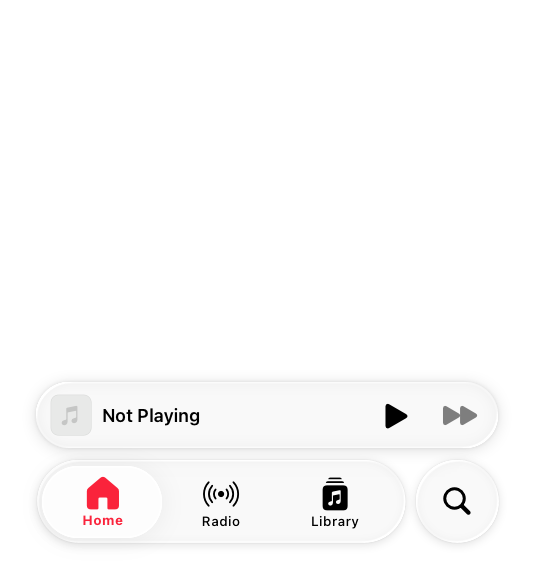
A tab bar with an attached accessory, expanded. Source: Apple Human Interface Guidelines
Implementation for iOS 26Link to heading
The following code snippet is working iOS 18.x and iOS 26+:
Tab(role: .search, value: .search) { NavigationStack { searchContent .searchable(text: $searchViewModel.query) }} label: { Label("Search", systemImage: "magnifyingglass")}Important: The .searchable() modifier must be applied within the NavigationStack. The search field then automatically appears in the tab bar itself so iOS 26 do the magic here for us.
Fallback for iOS 18.xLink to heading
For older iOS versions, I integrated the search functionality into a “More” tab instead of a dedicated search tab. The search bar is placed at the top of the content area. Both ways has the search after one tap, but the iOS 26 version is much more elegant.
Tab(value: .more) {    NavigationStack {        VStack(spacing: 0) {            SearchBar(text: $searchViewModel.query)
            if searchViewModel.query.isEmpty {                MoreMenuView()            } else {                SearchResultsView()            }        }        .navigationTitle("More")    }} label: {    Label("More", systemImage: "ellipsis")}
The classic search bar is a simple HStack with a TextField and clear button:
struct SearchBar: View {    @Binding var text: String
    var body: some View {        HStack {            Image(systemName: "magnifyingglass")            TextField("Search...", text: $text)        }    }}
Step 3: The Complete PictureLink to heading
The final approach combines both variants in an adaptive solution:
TabView(selection: $selectedTab) {    // Regular tabs    Tab(value: .home) {        NavigationStack(path: $homePath) {            HomeView()        }    } label: {        Label("Home", systemImage: "house")    }
    // Version-specific search    if #available(iOS 26, *) {        Tab(role: .search, value: .search) {            NavigationStack {                SearchView()                    .searchable(text: $query)            }        }    } else {        Tab(value: .more) {            NavigationStack {                VStack {                    SearchBar(text: $query)                    SearchView()                }            }        }    }}
Common PitfallsLink to heading
NavigationStack PlacementLink to heading
Wrong: NavigationStack outside the TabView
// ❌ All tabs share one stackNavigationStack { TabView { ... }}Correct: Each tab has its own stack
// ✓ Independent navigation per tabTabView { Tab(value: .home) { NavigationStack(path: $homePath) { ... } }}.searchable() Position (iOS 26)Link to heading
// ❌ WrongTab(role: .search) {    SearchView()}.searchable(text: $query)
// ✓ CorrectTab(role: .search) {    NavigationStack {        SearchView()            .searchable(text: $query)    }}
Missing value ParameterLink to heading
// ❌ Selection won't workTab("Home") { HomeView() }
// ✓ With value for selection bindingTab(value: .home) { HomeView() }
Search Bar Position Bug with .toolbar(.hidden)Link to heading
I encountered a strange bug where the iOS 26 search bar would behave strange: after searching, navigating to a detail view, and then navigating back, the search bar would suddenly appear at the top instead of the bottom tab bar.
The culprit was .toolbar(.hidden, for: .tabBar) on the detail screen. This modifier caused unexpected side effects with the search tab’s position. Once I removed it, the search bar stayed properly positioned in the tab bar.
// ❌ Causes search bar position bugNavigationLink("Detail") {    DetailView()        .toolbar(.hidden, for: .tabBar)  // Don't do this!}
// ✓ Let the tab bar handle itselfNavigationLink("Detail") {    DetailView()}
Best PracticesLink to heading
Type-Safe Tab Identifiers:
Use an enum with Hashable conformance for tab values:
enum AppTab: Hashable { case home, search, settings}Separate Navigation Paths:
@State private var homePath = NavigationPath()@State private var searchPath = NavigationPath()Direct ViewModel Binding for MVVM Lovers:
.searchable(text: $searchViewModel.query)ConclusionLink to heading
Migrating to the new Tab API took some initial work, but the result is a significantly clearer code structure. The iOS 26 integration of the search bar directly into the tab bar is a major UX win: space-efficient, always accessible, elegant.
Through the version-adaptive approach, users with older iOS versions can still use the app without issues, while iOS 26 users benefit from the modern Liquid Glass UI.
Key Takeaways:
- Tab bars are the most robust navigation pattern for iOS apps
- Each tab needs its own NavigationStack with a separate path
- iOS 26 search tab saves space and significantly improves UX
- Version checks enable modern features with solid fallback
.searchable()must be placed within the NavigationStack