# My ZSH Setup - Oh My Zsh, Plugins & Configuration
Table of Contents
As developers, we spend a significant portion of our time in the terminal. A well-configured shell can dramatically increase productivity and make daily work more enjoyable. In this post, I’ll walk you through my personal ZSH setup with Oh My Zsh, the plugins I use, and how everything is configured.
💡 Why ZSH? ZSH offers extended features over Bash like better tab completion, spell correction, themes, and a huge plugin ecosystem.
Installation and Basic SetupLink to heading
Installing ZSHLink to heading
# macOS (usually pre-installed)brew install zsh
# Ubuntu/Debiansudo apt install zsh
# Set as default shellchsh -s $(which zsh)
Installing Oh My ZshLink to heading
Oh My Zsh is a framework that simplifies ZSH configuration and provides hundreds of plugins and themes.
sh -c "$(curl -fsSL https://raw.github.com/ohmyzsh/ohmyzsh/master/tools/install.sh)"Theme ConfigurationLink to heading
A good theme doesn’t just make the terminal prettier, but also more informative. Oh My Zsh offers hundreds of themes to choose from. Here are my recommendations:
Avit Theme (my choice)Link to heading
The Avit theme is minimalistic and shows all important information:
# In ~/.zshrcZSH_THEME="avit"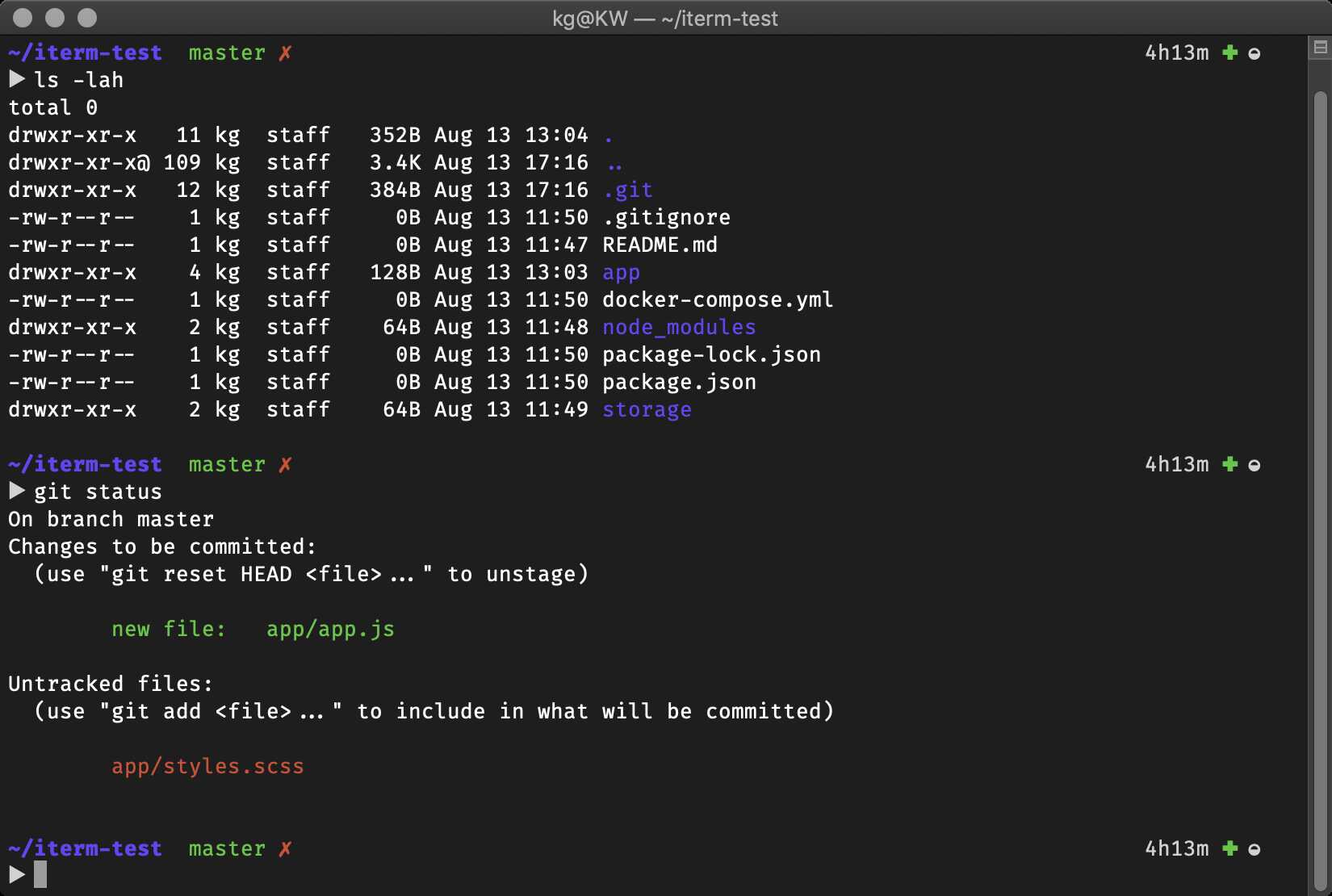
The Avit theme in action - clean, informative, and developer-friendly
Alternative: AgnosterLink to heading
For more information and Git status:
ZSH_THEME="agnoster"Other Popular ThemesLink to heading
Check out the official theme gallery for screenshots and descriptions of all available themes. Other highly recommended alternatives:
- robbyrussell - The default theme, minimalistic
- powerlevel10k - Very powerful and configurable (separate plugin)
- spaceship - Modern with lots of information
- pure - Minimalistic and fast
The Avit theme displays:
- ✅ Current path
- 🌿 Git branch and status
- ⚡ Exit code of last command
- 🕐 Timestamp
Essential PluginsLink to heading
Plugins are the heart of a productive ZSH configuration. For a comprehensive list of all available plugins, check out the Awesome ZSH Plugins collection. Here are the most important ones:
# In ~/.zshrcplugins=(  zsh-syntax-highlighting  # Syntax highlighting for commands  zsh-autosuggestions      # Intelligent command suggestions
  git                      # Git aliases and functions  colored-man-pages        # Colored man pages  colorize                 # Syntax highlighting for files  github                   # GitHub CLI integration  python                   # Python-specific aliases  brew                     # Homebrew integration (macOS)  macos                    # macOS-specific utilities
  docker                   # Docker commands and completion  docker-compose           # Docker Compose support  zsh-completions          # Extended tab completion)
Environment & Path ConfigurationLink to heading
Clean PATH configuration is essential for a functioning development environment:
# Base PATHexport PATH="/usr/local/bin:/usr/bin:/bin:/usr/sbin:/sbin"
# Homebrew (macOS)export PATH="/opt/homebrew/bin:$PATH"
# Ruby via RVMexport PATH="$PATH:$HOME/.rvm/bin"
# Node.js via NVMexport NVM_DIR="$HOME/.nvm"[ -s "$NVM_DIR/nvm.sh" ] && \. "$NVM_DIR/nvm.sh"[ -s "$NVM_DIR/bash_completion" ] && \. "$NVM_DIR/bash_completion"
# Bunexport BUNVM_DIR="$HOME/.bunvm"export PATH="$HOME/.bunvm/versions/bun-1.3.9/bin:$PATH"[ -s "$HOME/.bun/_bun" ] && source "$HOME/.bun/_bun"
# zsh-z - intelligent directory navigationsource ~/.zsh-plugins/zsh-z.plugin.zsh
Useful KeybindingsLink to heading
ZSH offers powerful keybindings for more efficient navigation:
# Jump forward by word with Ctrl+Fbindkey '^f' vi-forward-blank-word
# Other useful bindingsbindkey '^R' history-incremental-search-backward  # Reverse searchbindkey '^[[A' history-search-backward            # Arrow upbindkey '^[[B' history-search-forward             # Arrow down
Performance OptimizationLink to heading
With many plugins, ZSH can become slow. Here are optimization tips:
Limit Plugin CountLink to heading
# Only load plugins you actually useplugins=(git zsh-syntax-highlighting zsh-autosuggestions)Lazy Loading for Heavy ToolsLink to heading
# Load NVM only when needednvm() { unset -f nvm [ -s "$NVM_DIR/nvm.sh" ] && \. "$NVM_DIR/nvm.sh" nvm "$@"}Measure Startup TimeLink to heading
# Time the startuptime zsh -i -c exitMore Interesting PluginsLink to heading
The Awesome ZSH Plugins list contains hundreds of additional plugins for special use cases:
- thefuck - Automatically corrects erroneous commands
- zsh-z - Intelligent directory navigation
- fast-syntax-highlighting - Even faster syntax highlighting
- zsh-history-substring-search - Better history search
- zsh-abbr - Abbreviations like in Fish Shell
Essential AliasesLink to heading
While plugins extend functionality, aliases save keystrokes daily. Here are some must-have aliases that complement your plugin setup:
Git AliasesLink to heading
# Git shortcuts in ~/.zshrcalias g="git"alias gp="git push"alias gf="git fetch"alias gpu="git pull"alias gch="git checkout"alias gfork="open -a fork ." # Open Fork app (macOS)Modern CLI Tool AliasesLink to heading
# Better versions of standard commandsalias ols='ls' # Backup original lsalias ls='eza -la' # Modern ls replacementalias ll='eza -lbhHigUmuSa --time-style=long-iso --git --color-scale'alias lls='ll --sort=size' # Sort by sizealias cat='bat' # cat with syntax highlightingDocker & DevelopmentLink to heading
# Docker shortcutsalias dp="ctop"                 # Container monitoringalias dps="lazydocker"          # Docker TUI
# Quick accessalias o="open" # Open file/folder (macOS)alias s="subl" # Sublime TextPythonLink to heading
# Pythonalias python=/usr/local/bin/python3.6alias pip=/usr/bin/pip3Backup and SynchronizationLink to heading
Back up your ZSH configuration:
# Put .zshrc in Git repositorycd ~git initgit add .zshrcgit commit -m "Initial zsh config"
# Or use dotfiles managers like stow or chezmoiConclusionLink to heading
A well-configured ZSH makes daily development work more efficient and enjoyable. The configurations shown form a solid foundation that you can extend according to your needs. This should give you an idea what is possible with ZSH and Oh My Zsh, and how to set up a powerful terminal environment. It’s very individual thing, so feel free to experiment with themes, plugins, and aliases to find what works best for you. Happy coding!